Till sidans innehåll

VJ-Software (Download)

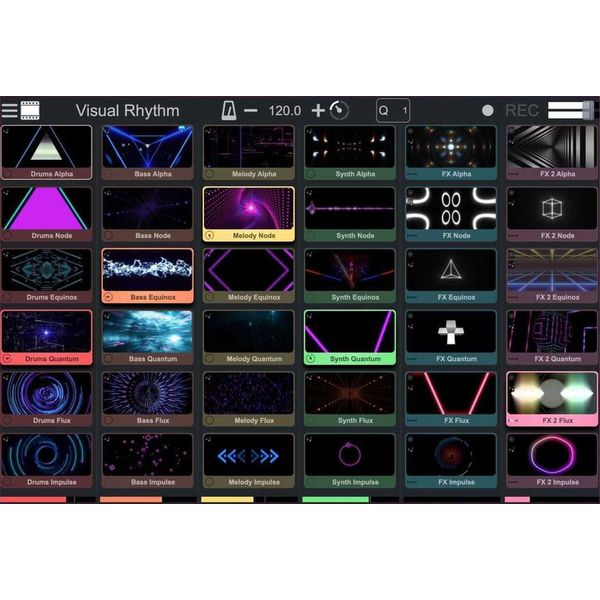
  • Complete VJ solution for combining music and visual media
  • Link audio samples to video pads for playback of fully synchronised video samples
  • Modular matrix with up to 8x8 pads
  • Import your own video and audio samples into the matrix
  • Integrated video and audio editor for easy customisation of samples
  • Image control with video projection mapping and master video editor
  • Direct output for second screen for playback of the live performance
  • Comes with 18 video effects and seven mixing modes
  • Integrated mixer with audio and video faders, filters, EQ, mute and solo
  • Real-time tempo changes including time-stretching and tap function
  • Autopilot automatically plays pad sequences
  • Live video input
  • Use as a VST / AU plugin and synchronisation via Ableton Link
  • Support for all major AV formats and video codes
  • MIDI control and learning function
  • Contains 144 freely usable video samples in various resolutions and 36 audio samples
  • 48 GLSL files created in real time and responding to audio and 13 transparent background video samples
Systemkrav
  • Format: E-Mail
  • License validity: perpetual
  • Copy protection: Online activation
  • Simultaneous activations: 1
  • Windows: from 7
  • Mac OS (64 Bit): not supported
  • CPU min.: Intel Core i5
  • RAM min. (GB): 4
  • Additional System requirements: Internet Connection for Installation and Activation
  • Tillgänglig sedan Juni 2024
  • Artikelnummer 595073
  • försäljningsenhet 1 Styck
  • For PC Yes
  • for Mac No
  • Download Yes
885 kr
ink moms
Omedelbart tillgänglig

4 Kundbetyg

3 / 5

drift

bild/ljud

funktioner

datoranvändning

4 Recensioner

google translate de
Tyvärr uppstod ett fel. försök igen senare.
C
Einerseits ein günstiges, leicht zu bedienendes Programm, andererseits fehlen wichtige Funktionen, die Software macht Probl
Chris-H 21.07.2025
Zunächst die negativen Punkte:
- Die Software wird offensichtlich nicht mehr weiter entwickelt. Interne Links sind tot, es gab lange keine Updates oder Tutorials mehr, auf meine Support Anfrage per Mail hat bisher niemand reagiert.
- Einige wichtige Standardfunktionen, wie z.B. Texteingabe/-animation, Effekte für einzelne Clips, eine Playlist oder ein Vorschaufenster gibt es nicht.
- Die integrierten „Generators“ (auf Audio reagierende GLSL-Files) sind meiner Meinung nach sehr enttäuschend.

Es gibt aber auch positives zu berichten:
- Die Software ist einfach aufgebaut, innerhalb weniger Minuten hat man alles wichtige verstanden und kann loslegen.
- Sie läuft relativ stabil und flüssig, nur beim laden von Dateien stürzt sie bei mir häufig ab.
- Es kommt einiges an Content mit, viele brauchbare Videoloops, Audioloops und die oben erwähnten, aber eher enttäuschenden Generators.
- Mit einem Midi Controller lässt sich die Software gut bedienen.
- Wer das Ganze nur nebenbei laufen lassen will, lädt einfach ein paar Videoclips in die Matrix und lässt sie vom Autopilot abspielen.
- Eine richtige Projection-Mapping Funktion gibt es nicht, aber zumindest die rechteckige Ausgabe auf dem Projektor kann man anpassen.
- Wer das Bild z.B. zum mappen weiterverarbeiten will, kann das über die Spout bzw. Syphon Ausgabe machen. Die Weiterverarbeitung über die kostenlose Mapping-Software VPT8 funktionierte bei mir gut.

Mein Fazit: Eine simple Software, mit der man schnell und unkompliziert ein paar Videoeffekte an die Wand zaubern kann. Sobald man etwas professioneller arbeiten will, stößt man schnell auf Grenzen und Probleme. Dabei sollte man bedenken, dass professionelle Software, wie Madmapper oder Resolume schnell das zehnfache und mehr kostet.

funktioner
datoranvändning
drift
bild/ljud
0
0
Anmäl recension

Anmäl recension